This blog documents an evolutionary process with limited reference value. It is recommended to directly check the projects below and deploy them quickly using Docker.
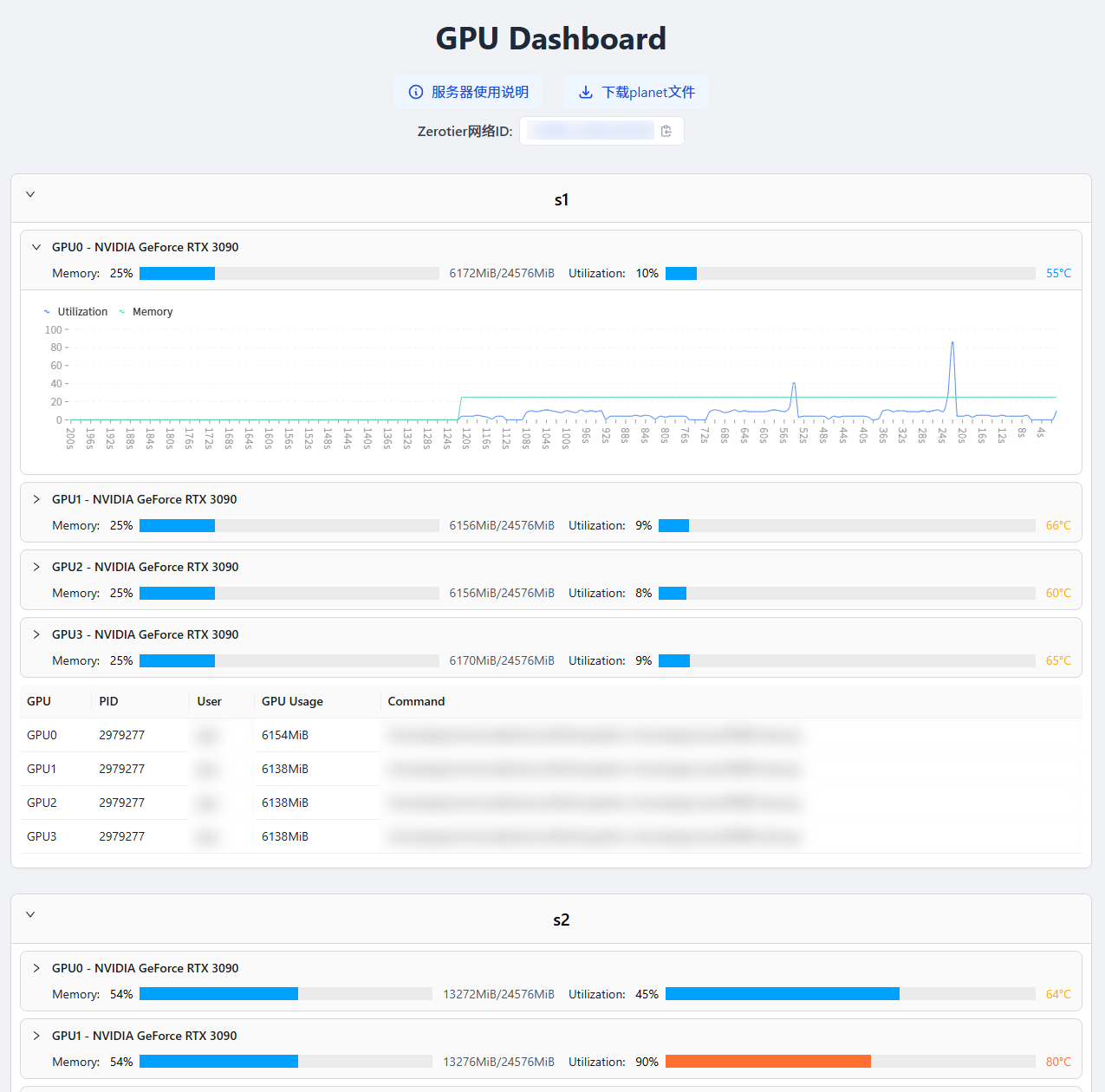
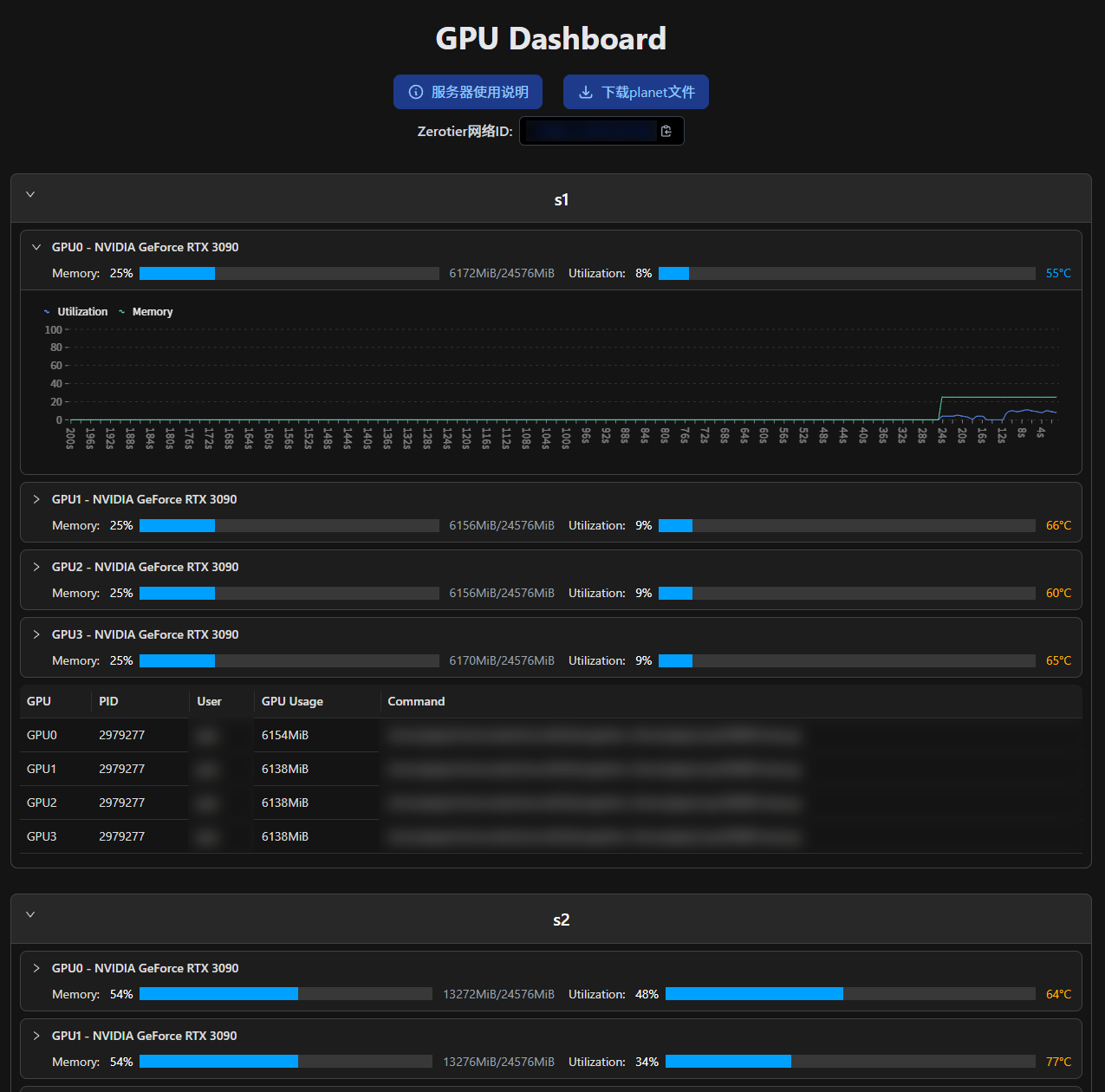
Visual effect:
| Light | Dark |
|---|---|
![]() | ![]() |
Previous frontend experience was limited to generating HTML with Python, so I set up a GPU monitoring solution on my small host:
The corresponding code is as follows:
This solution has several obvious drawbacks: low update frequency and complete reliance on backend updates, meaning data is refreshed continuously regardless of whether anyone is accessing it.
I've always wanted to implement a frontend-backend separated GPU monitoring system. Each server runs a fastapi service that returns required data only when requested. Recently, developing Nan Na Charging gave me confidence to build a frontend that fetches data from APIs and renders it on the page.
Recently, I discovered nvitop supports Python calls—previously I thought it could only be used through command-line visualization. This is great because it makes retrieving required data much easier and significantly reduces code volume! ( •̀ ω •́ )✧
However, there’s one issue: our lab servers are behind a router not under my control, and only SSH ports are forwarded. I chose to use frp to map each server’s API port to my university’s small host. Fortunately, my small host hosts many web services, making it easy to access APIs via domain names.
Previously, I made a mistake—I could have simply used SSH (ssh -fN -L 8000:localhost:8000 user@ip) for port mapping. This way, I can remove frp-related code and make Docker deployment of the web frontend much simpler.
The code uses three environment variables:
SUBURL: Used to configure the API path, such as setting it to the server name.FRP_PATH: The path where frp and its configuration files are located, used to map the API port to my campus host. If your servers can be directly accessed, remove the relevant functions and change the last line to 0.0.0.0, then access via IP (or assign a domain name to each server).PORT: The port on which the API is running.Here, I only wrote two endpoints , but actually only used one
/count: Returns the number of GPUs./status: Returns detailed status information. The returned data is visible in the example below. Additionally, I added two optional parameters:
idx: Comma-separated numbers to get the status of specific GPUs.process: Used to filter returned processes. When I use it, I set it to C to show only computational tasks.For now, I'll take a shortcut —actually because I don't know how—and temporarily copy the UI originally generated by Python.
Running npm run build successfully produced the release files. Simply configure nginx's root to this folder, and the task is complete.
Result: https://nvtop.njucite.cn/
Although the UI is still ugly, at least it now refreshes dynamically—yay!
I'll put the pie chart here first, waiting until I finish learning. ( ̄_, ̄ )
More beautiful UI (Whether this goal was achieved is uncertain—I'm terrible at design) Add utilization line chart Support dark mode
December 27, 2024: Used Next.js to complete all the above TODOs. Additionally, implemented hiding certain hosts and storing hidden host settings in cookies for consistent display upon next visit.
March 11, 2025: Next.js added email login functionality, restricting access to authorized users only.
September 18, 2025: Cleaned up the codebase—now features are mostly complete and easy for others to deploy.
Full code available at:
# main.py
import subprocess
from copy import deepcopy
import json
from markdown import markdown
import time
from parse import parse, parse_proc
from gen_md import gen_md
num_gpus = {
"s1": 4,
"s2": 4,
"s3": 2,
"s4": 4,
"s5": 5,
}
def get1GPU(i, j):
cmd = ["ssh", "-o", "ConnectTimeout=2", f"s{i}", "nvidia-smi", f"-i {j}"]
try:
output = subprocess.check_output(cmd)
except subprocess.CalledProcessError as e:
return None, None
ts = int(time.time())
output = output.decode("utf-8")
ret = parse(output)
processes = deepcopy(ret["processes"])
ret["processes"] = []
for pid in processes:
cmd = [
"ssh",
f"s{i}",
"ps",
"-o",
"pid,user:30,command",
"--no-headers",
"-p",
pid[0],
]
output = subprocess.check_output(cmd)
output = output.decode("utf-8")
proc = parse_proc(output, pid[0])
ret["processes"].append(proc)
ret["processes"][-1]["pid"] = pid[0]
ret["processes"][-1]["used_mem"] = pid[1]
return ret, ts
def get_html(debug=False):
results = {}
for i in range(1, 6):
results_per_host = {}
for j in range(num_gpus[f"s{i}"]):
ret, ts = get1GPU(i, j)
if ret is None:
continue
results_per_host[f"GPU{j}"] = ret
results[f"s{i}"] = results_per_host
md = gen_md(results)
with open("html_template.html", "r") as f:
template = f.read()
html = markdown(md, extensions=["tables", "fenced_code"])
html = template.replace("{{html}}", html)
html = html.replace(
"{{update_time}}", time.strftime("%Y-%m-%d %H:%M", time.localtime())
)
if debug:
with open("results.json", "w") as f:
f.write(json.dumps(results, indent=2))
with open("results.md", "w", encoding="utf-8") as f:
f.write(md)
with open("index.html", "w", encoding="utf-8") as f:
f.write(html)
if __name__ == "__main__":
import sys
debug = False
if len(sys.argv) > 1 and sys.argv[1] == "debug":
debug = True
get_html(debug)
# parse.py
def parse(text: str) -> dict:
lines = text.split('\n')
used_mem = lines[9].split('|')[2].split('/')[0].strip()[:-3]
total_mem = lines[9].split('|')[2].split('/')[1].strip()[:-3]
temperature = lines[9].split('|')[1].split()[1].replace('C', '')
used_mem, total_mem, temperature = int(used_mem), int(total_mem), int(temperature)
processes = []
for i in range(18, len(lines) - 2):
line = lines[i]
if 'xorg/Xorg' in line:
continue
if 'gnome-shell' in line:
continue
pid = line.split()[4]
use = line.split()[7][:-3]
processes.append((pid, int(use)))
return {
'used_mem': used_mem,
'total_mem': total_mem,
'temperature': temperature,
'processes': processes
}
def parse_proc(text: str, pid: str) -> dict:
lines = text.split('\n')
for line in lines:
if not line:
continue
if line.split()[0] != pid:
continue
user = line.split()[1]
cmd = ' '.join(line.split()[2:])
return {
'user': user,
'cmd': cmd
}
# gen_md.py
def per_server(server: str, results: dict) -> str:
md = f'# {server}\n\n'
for gpu, ret in results.items():
used, total, temperature = ret['used_mem'], ret['total_mem'], ret['temperature']
md += f'<div class="oneGPU">\n'
md += f' <code>{gpu}: </code>\n'
md += f' <div class="g-container" style="display: inline-block;">\n'
md += f' <div class="g-progress" style="width: {used/total*100}%;"></div>\n'
md += f' </div>\n'
md += f' <code> {used:5d}/{total} MiB {temperature}℃</code>\n'
md += '</div>\n'
md += '\n'
if any([len(ret["processes"]) > 0 for ret in results.values()]):
md += '\n| GPU | PID | User | Command | GPU Usage |\n'
md += '| --- | --- | --- | --- | --- |\n'
for gpu, ret in results.items():
for proc in ret["processes"]:
md += f'| {gpu} | {proc["pid"]} | {proc["user"]} | {proc["cmd"]} | {proc["used_mem"]} MB |\n'
md += '\n\n'
return md
def gen_md(results: dict) -> dict:
md = ''
for server, ret in results.items():
md += per_server(server, ret)
return md
# main.py
from fastapi import FastAPI, Request
from fastapi.middleware.cors import CORSMiddleware
from fastapi.middleware.gzip import GZipMiddleware
from fastapi.responses import JSONResponse
import uvicorn
from nvitop import Device, bytes2human
import os
import asyncio
from contextlib import asynccontextmanager
suburl = os.environ.get("SUBURL", "")
if suburl != "" and not suburl.startswith("/"):
suburl = "/" + suburl
frp_path = os.environ.get("FRP_PATH", "/home/peijie/Nvidia-API/frp")
if not os.path.exists(f"{frp_path}/frpc") or not os.path.exists(
f"{frp_path}/frpc.toml"
):
raise FileNotFoundError("frpc or frpc.toml not found in FRP_PATH")
@asynccontextmanager
async def run_frpc(app: FastAPI): # frp tunnel to my campus host
command = [f"{frp_path}/frpc", "-c", f"{frp_path}/frpc.toml"]
process = await asyncio.create_subprocess_exec(
*command,
stdout=asyncio.subprocess.DEVNULL,
stderr=asyncio.subprocess.DEVNULL,
stdin=asyncio.subprocess.DEVNULL,
close_fds=True,
)
try:
yield
finally:
try:
process.terminate()
await process.wait()
except ProcessLookupError:
pass
app = FastAPI(lifespan=run_frpc)
app.add_middleware(GZipMiddleware, minimum_size=100)
app.add_middleware(
CORSMiddleware,
allow_origins=["*"],
allow_credentials=True,
allow_methods=["*"],
allow_headers=["*"],
)
@app.get(f"{suburl}/count")
async def get_ngpus(request: Request):
try:
ngpus = Device.count()
return JSONResponse(content={"code": 0, "data": ngpus})
except Exception as e:
return JSONResponse(
content={"code": -1, "data": None, "error": str(e)}, status_code=500
)
@app.get(f"{suburl}/status")
async def get_status(request: Request):
try:
ngpus = Device.count()
except Exception as e:
return JSONResponse(
content={"code": -1, "data": None, "error": str(e)}, status_code=500
)
idx = request.query_params.get("idx", None)
if idx is not None:
try:
idx = idx.split(",")
idx = [int(i) for i in idx]
for i in idx:
if i < 0 or i >= ngpus:
raise ValueError("Invalid GPU index")
except ValueError:
return JSONResponse(
content={"code": 1, "data": None, "error": "Invalid GPU index"},
status_code=400,
)
else:
idx = list(range(ngpus))
process_type = request.query_params.get("process", "")
if process_type not in ["", "C", "G", "NA"]:
return JSONResponse(
content={
"code": 1,
"data": None,
"error": "Invalid process type, choose from C, G, NA",
},
status_code=400,
)
try:
devices = []
processes = []
for i in idx:
device = Device(i)
devices.append(
{
"idx": i,
"fan_speed": device.fan_speed(),
"temperature": device.temperature(),
"power_status": device.power_status(),
"gpu_utilization": device.gpu_utilization(),
"memory_total_human": f"{round(device.memory_total() / 1024 / 1024)}MiB",
"memory_used_human": f"{round(device.memory_used() / 1024 / 1024)}MiB",
"memory_free_human": f"{round(device.memory_free() / 1024 / 1024)}MiB",
"memory_utilization": round(
device.memory_used() / device.memory_total() * 100, 2
),
}
)
now_processes = device.processes()
sorted_pids = sorted(now_processes)
for pid in sorted_pids:
process = now_processes[pid]
if process_type == "" or process_type in process.type:
processes.append(
{
"idx": i,
"pid": process.pid,
"username": process.username(),
"command": process.command(),
"type": process.type,
"gpu_memory": bytes2human(process.gpu_memory()),
}
)
return JSONResponse(
content={
"code": 0,
"data": {"count": ngpus, "devices": devices, "processes": processes},
}
)
except Exception as e:
return JSONResponse(
content={"code": -1, "data": None, "error": str(e)}, status_code=500
)
if __name__ == "__main__":
port = int(os.environ.get("PORT", "8000"))
uvicorn.run(app, host="127.0.0.1", port=port, reload=False)
{
"code": 0,
"data": {
"count": 2,
"devices": [
{
"idx": 0,
"fan_speed": 41,
"temperature": 71,
"power_status": "336W / 350W",
"gpu_utilization": 100,
"memory_total_human": "24576MiB",
"memory_used_human": "18653MiB",
"memory_free_human": "5501MiB",
"memory_utilization": 75.9
},
{
"idx": 1,
"fan_speed": 39,
"temperature": 67,
"power_status": "322W / 350W",
"gpu_utilization": 96,
"memory_total_human": "24576MiB",
"memory_used_human": "18669MiB",
"memory_free_human": "5485MiB",
"memory_utilization": 75.97
}
],
"processes": [
{
"idx": 0,
"pid": 1741,
"username": "gdm",
"command": "/usr/lib/xorg/Xorg vt1 -displayfd 3 -auth /run/user/125/gdm/Xauthority -background none -noreset -keeptty -verbose 3",
"type": "G",
"gpu_memory": "4.46MiB"
},
{
"idx": 0,
"pid": 2249001,
"username": "xxx",
"command": "~/.conda/envs/torch/bin/python -u train.py",
"type": "C",
"gpu_memory": "18618MiB"
},
{
"idx": 1,
"pid": 1741,
"username": "gdm",
"command": "/usr/lib/xorg/Xorg vt1 -displayfd 3 -auth /run/user/125/gdm/Xauthority -background none -noreset -keeptty -verbose 3",
"type": "G",
"gpu_memory": "9.84MiB"
},
{
"idx": 1,
"pid": 1787,
"username": "gdm",
"command": "/usr/bin/gnome-shell",
"type": "G",
"gpu_memory": "6.07MiB"
},
{
"idx": 1,
"pid": 2249002,
"username": "xxx",
"command": "~/.conda/envs/torch/bin/python -u train.py",
"type": "C",
"gpu_memory": "18618MiB"
}
]
}
}
<!-- App.vue -->
<script setup>
import GpuMonitor from './components/GpuMonitor.vue';
let urls = [];
let titles = [];
for (let i = 1; i <= 5; i++) {
urls.push(`https://xxxx/status?process=C`);
titles.push(`s${i}`);
}
const data_length = 100; // Length of GPU utilization history data, used for drawing line charts (just draw a pie for now)
const sleep_time = 500; // Interval to refresh data, in milliseconds
</script>
<template>
<h3><a href="https://www.do1e.cn/posts/citelab/server-help">Server Usage Guide</a></h3>
<GpuMonitor v-for="(url, index) in urls" :key="index" :url="url" :title="titles[index]" :data_length="data_length" :sleep_time="sleep_time" />
</template>
<style scoped>
body {
margin-left: 20px;
margin-right: 20px;
}
</style>
<!-- components/GpuMonitor.vue -->
<template>
<div>
<h1>{{ title }}</h1>
<article class="markdown-body">
<div v-for="device in data.data.devices" :key="device.idx">
<b>GPU{{ device.idx }}: </b>
<b>Memory: </b>
<div class="g-container">
<div class="g-progress" :style="{ width: device.memory_utilization + '%' }"></div>
</div>
<code style="width: 25ch;">{{ device.memory_used_human }}/{{ device.memory_total_human }} {{ device.memory_utilization }}%</code>
<b>Utilization: </b>
<div class="g-container">
<div class="g-progress" :style="{ width: device.gpu_utilization + '%' }"></div>
</div>
<code style="width: 5ch;">{{ device.gpu_utilization }}%</code>
<b>Temperature: </b>
<code style="width: 4ch;">{{ device.temperature }}°C</code>
</div>
<table v-if="data.data.processes.length > 0">
<thead>
<tr><th>GPU</th><th>PID</th><th>User</th><th>Command</th><th>GPU Usage</th></tr>
</thead>
<tbody>
<tr v-for="process in data.data.processes" :key="process.pid">
<td>GPU{{ process.idx }}</td>
<td>{{ process.pid }}</td>
<td>{{ process.username }}</td>
<td>{{ process.command }}</td>
<td>{{ process.gpu_memory }}</td>
</tr>
</tbody>
</table>
</article>
</div>
</template>
<script>
import axios from 'axios';
import { Chart, registerables } from 'chart.js';
Chart.register(...registerables);
export default {
props: {
url: String,
title: String,
data_length: Number,
sleep_time: Number
},
data() {
return {
data: {
code: 0,
data: {
count: 0,
devices: [],
processes: []
}
},
gpuUtilHistory: {}
};
},
mounted() {
this.fetchData();
this.interval = setInterval(this.fetchData, this.sleep_time);
},
beforeDestroy() {
clearInterval(this.interval);
},
methods: {
fetchData() {
axios.get(this.url)
.then(response => {
if (response.data.code !== 0) {
console.error('Error fetching GPU data:', response.data);
return;
}
this.data = response.data;
for (let device of this.data.data.devices) {
if (!this.gpuUtilHistory[device.idx]) {
this.gpuUtilHistory[device.idx] = Array(this.data_length).fill(0);
}
this.gpuUtilHistory[device.idx].push(device.gpu_utilization);
this.gpuUtilHistory[device.idx].shift();
}
})
.catch(error => {
console.error('Error fetching GPU data:', error);
});
}
}
};
</script>
<style>
.g-container {
width: 200px;
height: 15px;
border-radius: 3px;
background: #eeeeee;
display: inline-block;
}
.g-progress {
height: inherit;
border-radius: 3px 0 0 3px;
background: #6e9bc5;
}
code {
display: inline-block;
text-align: right;
background-color: #ffffff !important;
}
</style>
// main.js
import { createApp } from 'vue'
import App from './App.vue'
createApp(App).mount('#app')
<!DOCTYPE html>
<html lang="">
<head>
<meta charset="UTF-8">
<link rel="icon" href="/favicon.ico">
<meta name="viewport" content="width=device-width, initial-scale=1.0">
<link rel="stylesheet" href="https://cdnjs.cloudflare.com/ajax/libs/github-markdown-css/5.2.0/github-markdown.min.css">
<title>Lab GPU Usage Status</title>
</head>
<body>
<div id="app"></div>
<script type="module" src="/src/main.js"></script>
</body>
</html>