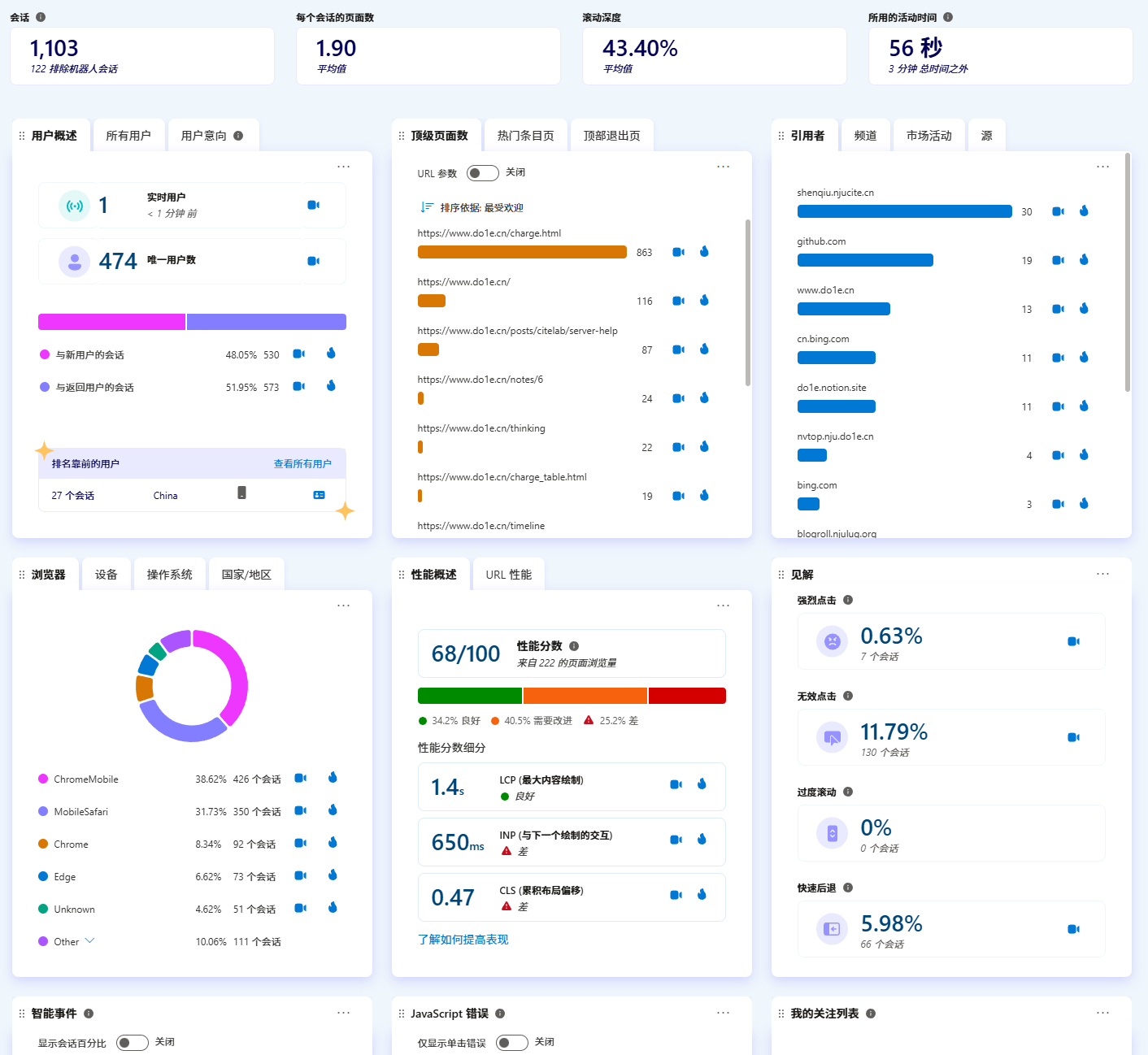
Microsoft Clarity can analyze user behavior visiting the website, and this website has also integrated it.
Personally, I think it is quite useful; I can check the website's visit status when I have free time.
It is very simple to use; just add the line of code provided by the backend into the <head> tag.

However, many ad blocking rules block Clarity's domain, so a lot of user connection data will be missing. But you can avoid this by using nginx reverse proxy to your own domain. Here are the specific steps for your reference.
Below is a code example added in the <head> tag.
<script type="text/javascript">
(function(c,l,a,r,i,t,y){
c[a]=c[a]||function(){(c[a].q=c[a].q||[]).push(arguments)};
t=l.createElement(r);t.async=1;t.src="https://www.clarity.ms/tag/"+i;
y=l.getElementsByTagName(r)[0];y.parentNode.insertBefore(t,y);
})(window, document, "clarity", "script", "abcdefg");
</script>
Or open the browser's developer tools to capture packets, and you can see that the relevant code will first request https://www.clarity.ms/tag/abcdefg, which downloads a js script:
Among them, there are 3 links:
You need to replace the above links one by one.
Assume your domain is example.com, you can create a subdomain clarity.example.com and resolve it to an nginx server on your public network.
At this point, you can save the script requested by https://www.clarity.ms/tag/abcdefg to /var/www/html/tag/abcdefg.
mkdir -p /var/www/html/tag
wget https://www.clarity.ms/tag/abcdefg -O /var/www/html/tag/abcdefg
Then replace the above 3 links as follows:
You also need to download https://www.clarity.ms/s/0.8.13-beta/clarity.js to /var/www/html/s/0.8.13-beta/clarity.js. The version might be different when you look at it, just modify accordingly. The /var/www/html directory mentioned above can also be modified by yourself, but pay attention to permissions to avoid the nginx process being unable to access it. At this time, the directory structure is as follows:
nginx reverse proxy configuration reference:
Replace www.clarity.ms in the script originally added to the website's <head> with clarity.example.com. That's it, try visiting your website and see if there are online real-time users in the backend!
clarity.js. However, you can also write a script yourself to implement automation. Reference code:(function (c, l, a, r, i, t, y) {
function sync() {
(new Image()).src = "https://c.clarity.ms/c.gif";
}
if ("complete" == document.readyState) {
sync();
} else {
window.addEventListener("load", sync);
}
if (a[c].v || a[c].t) {
return a[c]("event", c, "dup." + i.projectId);
}
a[c].t = true;
t = l.createElement(r);
t.async = true;
t.src = "https://www.clarity.ms/s/0.8.13-beta/clarity.js";
y = l.getElementsByTagName(r)[0];
y.parentNode.insertBefore(t, y);
a[c]("start", i);
a[c].q.unshift(a[c].q.pop());
a[c]("set", "C_IS", "0");
})(
"clarity",
document,
window,
"script",
{
projectId: "abcdefg",
upload: "https://z.clarity.ms/collect",
expire: 365,
cookies: ["_uetmsclkid", "_uetvid"],
track: true,
content: true,
unmask: ["body"],
dob: 2002
}
);
> tree /var/www/html
/var/www/html
├── clarity.js
├── s
│ ├── 0.8.13-beta
│ │ └── clarity.js
│ └── 0.8.9
│ └── clarity.js
└── tag
├── abcdefg
└── hijklmn
5 directories, 5 files
server {
listen 80;
listen [::]:80;
listen 443 ssl;
listen [::]:443 ssl;
server_name clarity.example.com;
if ($scheme = http) {
return 301 https://$host$request_uri;
}
location /c.gif {
proxy_pass https://c.clarity.ms$request_uri;
proxy_http_version 1.1;
proxy_set_header Upgrade $http_upgrade;
proxy_set_header Connection "upgrade";
proxy_set_header Host $host;
proxy_set_header X-Real-IP $remote_addr;
proxy_set_header X-Real-PORT $remote_port;
proxy_set_header X-Forwarded-For $proxy_add_x_forwarded_for;
}
location /collect {
proxy_pass https://z.clarity.ms$request_uri;
proxy_http_version 1.1;
proxy_set_header Upgrade $http_upgrade;
proxy_set_header Connection "upgrade";
proxy_set_header Host $host;
proxy_set_header X-Real-IP $remote_addr;
proxy_set_header X-Real-PORT $remote_port;
proxy_set_header X-Forwarded-For $proxy_add_x_forwarded_for;
}
root /var/www/html;
}
import os
import re
import requests
from dotenv import load_dotenv
load_dotenv()
PROJECT_ID = os.getenv("PROJECT_ID")
BASE_DIR = os.getenv("BASE_DIR", "/var/www/html/clarity")
CUSTOM_DOMAIN = os.getenv("CUSTOM_DOMAIN")
NGINX_CONF = os.getenv("NGINX_CONF", "/etc/nginx/conf.d/clarity.conf")
if not PROJECT_ID:
raise ValueError("PROJECT_ID is not set in the environment variables.")
if not CUSTOM_DOMAIN:
raise ValueError("CUSTOM_DOMAIN is not set in the environment variables.")
def get_index(try_times = 5):
resp = requests.get(f'https://www.clarity.ms/tag/{PROJECT_ID}')
if resp.status_code != 200:
if try_times > 0:
return get_index(try_times - 1)
raise RuntimeError(f"Failed to fetch data from Clarity. Status code: {resp.status_code}\n{resp.text}")
return resp
def get_script(url, try_times = 5):
resp = requests.get(url)
if resp.status_code != 200:
if try_times > 0:
return get_script(url, try_times - 1)
raise RuntimeError(f"Failed to fetch Clarity script. Status code: {resp.status_code}\n{resp.text}")
return resp
resp = get_index()
script_content = resp.text
clarity_js_url = re.search(r'https://www.clarity.ms/s/[^"]+\.js', script_content)
if not clarity_js_url:
raise RuntimeError("Clarity script URL not found in the response.")
clarity_js_url = clarity_js_url.group(0)
upload_url = re.search(r'"upload":"([^"]+)"', script_content)
if not upload_url:
raise RuntimeError("Upload URL not found in the response.")
upload_url = upload_url.group(1)
clarity_js_version = clarity_js_url.split('/')[-2]
clarity_js_path = os.path.join(BASE_DIR, 's', clarity_js_version, 'clarity.js')
if not os.path.exists(clarity_js_path):
resp = get_script(clarity_js_url)
os.makedirs(os.path.dirname(clarity_js_path), exist_ok=True)
with open(clarity_js_path, 'wb') as f:
f.write(resp.content)
with open(NGINX_CONF, 'w') as f:
f.write("""server {
listen 80;
listen [::]:80;
listen 443 ssl;
listen [::]:443 ssl;
server_name %s;
if ($scheme = http) {
return 301 https://$host$request_uri;
}
location /c.gif {
proxy_pass https://c.clarity.ms$request_uri;
proxy_http_version 1.1;
proxy_set_header Upgrade $http_upgrade;
proxy_set_header Connection "upgrade";
proxy_set_header Host $host;
proxy_set_header X-Real-IP $remote_addr;
proxy_set_header X-Real-PORT $remote_port;
proxy_set_header X-Forwarded-For $proxy_add_x_forwarded_for;
}
location /collect {
proxy_pass https://%s$request_uri;
proxy_http_version 1.1;
proxy_set_header Upgrade $http_upgrade;
proxy_set_header Connection "upgrade";
proxy_set_header Host $host;
proxy_set_header X-Real-IP $remote_addr;
proxy_set_header X-Real-PORT $remote_port;
proxy_set_header X-Forwarded-For $proxy_add_x_forwarded_for;
}
root %s;
}
""" % (CUSTOM_DOMAIN, upload_url.split('/')[2], BASE_DIR))
os.system('nginx -s reload')
new_script_content = script_content.replace(
'www.clarity.ms',
CUSTOM_DOMAIN
).replace(
upload_url.split('/')[2],
CUSTOM_DOMAIN
).replace(
'c.clarity.ms',
CUSTOM_DOMAIN
)
with open(os.path.join(BASE_DIR, 'tag', PROJECT_ID), 'w') as f:
f.write(new_script_content)